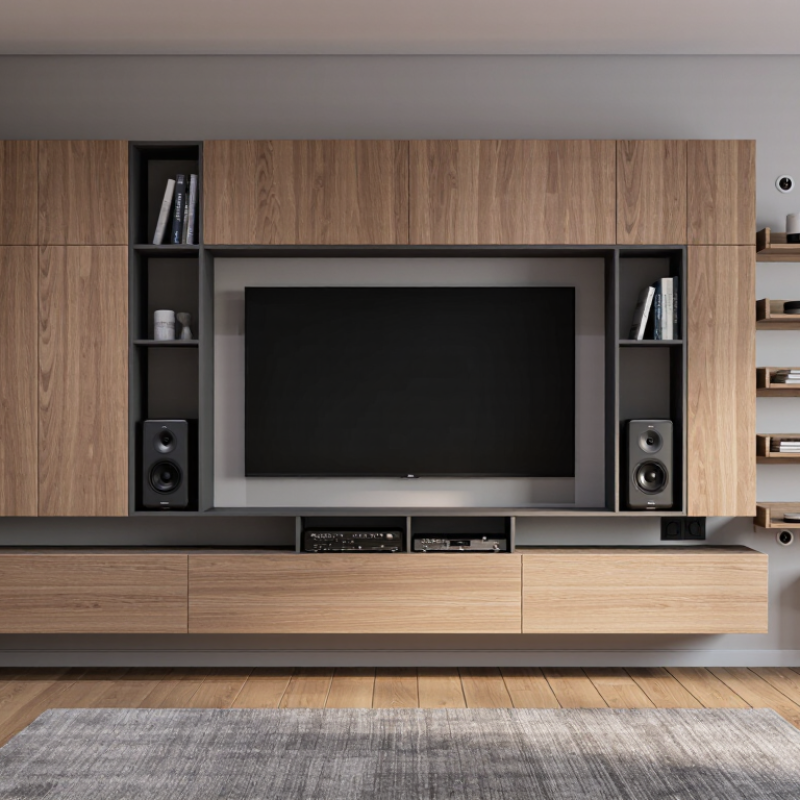
How to Choose the Right TV Wall Cabinet

Choosing the right Tv Wall Cabinet begins with the room you actually have, not the one in a showroom. Measure the television, wall width, viewing distance, and nearby doors before comparing styles. A cabinet that looks balanced online may overwhelm a narrow room. Check the wall structure and the unit’s stated load capacity, too. Safety matters more than a clean photo.

Interior designer Nate Berkus has said, “Your home should tell the story of who you are, and be a collection of what you love.” That idea can guide cabinet choices without turning the decision into a style contest. Consider whether you need closed storage for game consoles, open shelves for speakers, or a mix of both. Look closely at cable openings and ventilation. A tidy front is useful; trapped heat behind electronics is not. Small details count.

This guide will compare wall-mounted and floor-standing designs, common materials, storage layouts, and installation considerations. It will also cover finish, room proportions, and everyday access to devices. Think about how the space is used at night, not only how it looks in daylight. Some advice is less glamorous: measure twice, and confirm the mounting method suits your wall. There is no perfect cabinet for every home. Even careful planning can miss something, so leave room to reassess before buying.

How to Choose the Right TV Wall Cabinet

Assess the Room Layout and TV Dimensions

Measure the wall before shopping, including its width, height, and distance from nearby doors or windows. Then record the TV’s full width and height, not just its diagonal screen size. A 55-inch television can vary in width between models. Leave a few inches of cabinet beyond each side of the screen for visual balance, while checking that the unit will not crowd a doorway or block a window. Small details matter.

Next, consider how the room is used. Sit in the usual viewing spot and note your eye level; the screen should feel comfortable without forcing you to tilt your head. Check the cabinet height against the TV’s planned mounting position, and make sure cables can reach outlets without stretching across a walkway. Measure the wall’s usable depth, too. A deep cabinet may narrow a busy passage, even if it fits on paper. I have seen a layout look neat in a sketch but feel cramped once chairs and doors are in place. It is worth measuring again. Leave room for ventilation and for opening drawers or cabinet doors, especially in tight spaces.

Compare TV Wall Cabinet Types and Mounting Styles

A floating TV cabinet keeps the floor clear and gives a room a lighter look. It works well in smaller spaces, but its fasteners must suit both the wall and the cabinet’s loaded weight. Enclosed cabinets hide consoles and cables; check ventilation openings so devices do not overheat. Open shelves make remotes and game systems easy to reach, though dust gathers quickly. A low-profile cabinet can anchor a large screen without dominating the wall.

Small details matter.

Mounting style changes the installation. A cabinet secured directly through its back panel needs solid fixing points, usually wall studs or suitable masonry anchors. A French cleat or mounting rail can spread the load and make leveling easier, but only when rated for the cabinet and its contents. Never assume drywall alone is enough.

Also check that the TV bracket, cabinet, and cables will not interfere with each other. Measure the screen’s height and leave room for plugs and airflow. I would rethink any layout that looks neat but makes a power outlet hard to reach.

There is no perfect setup.

Select Materials, Storage, and Cable Management Features

A TV wall cabinet should suit the room’s daily use, not just its appearance. Solid wood feels substantial, but it can be heavy and costly. Veneered or engineered panels often offer a steadier, lighter option. Check the finish at the edges, where peeling or rough seams may show poor construction. Feel the surface in person if possible. Small details matter.

Think about what the cabinet will actually hold. Measure game consoles, speakers, and streaming devices, including space for ventilation around them. Adjustable shelves help when equipment changes, while drawers keep remotes and loose accessories out of sight. A shallow cabinet may look tidy, yet leave cables cramped behind the screen. Measure twice. I have seen that overlooked depth become an annoying daily compromise.

Cable management needs more than one small hole in the back panel. Look for wide openings that let plugs pass through, plus a clear route to the nearest outlet. Removable rear panels can make setup and dusting easier. Keep power cables separate from signal cables when practical, which can reduce clutter and make troubleshooting simpler. Avoid packing devices tightly into closed compartments; heat needs somewhere to go. Before buying, map the cable path from each device to the TV and outlet. The plan may still need adjustment once everything is installed.

How to Choose the Right TV Wall Cabinet - Select Materials, Storage, and Cable Management Features

Cabinet style Common materials Storage strengths Cable management to look for Best suited to Things to check
Floating cabinet MDF, plywood, or solid wood Keeps the floor clear; often offers drawers or closed compartments for small devices and accessories. Rear cutouts, internal cable channels, and openings that let cords reach wall outlets. Rooms where a clean, open floor line is important. Confirm the wall and fixing method can support the loaded cabinet; locate studs or use suitable masonry fixings.
Floor-standing console MDF, particleboard, plywood, or solid wood Typically provides a broad top surface, shelves, and cabinets for larger components or media collections. Back-panel openings and adjustable shelves help route and organize cables behind devices. Homes needing generous storage without mounting the cabinet to the wall. Check the cabinet's width and depth against the TV and components; use an anti-tip restraint where appropriate.
Modular wall unit MDF, particleboard, plywood, or mixed materials Combines cabinets, shelves, and display sections; components can be arranged to suit the room. Choose matching cable pass-throughs and allow routes between modules and the power outlet. A flexible setup with space for books, décor, and AV equipment. Measure the complete layout before purchase and follow the supplied instructions for anchoring each module.
Open-shelf cabinet Wood-based panels, solid wood, or metal Provides quick access to players, consoles, and other equipment; open shelves suit frequently used devices. Use rear cable holes, reusable ties, or clips to keep visible cords grouped and away from walkways. Equipment that needs easy access or clear airflow around it. Check shelf dimensions and device ventilation requirements; avoid blocking vents with stored items.
Closed-door cabinet MDF, plywood, or solid wood, sometimes with glass-front doors Conceals accessories and reduces visual clutter; adjustable shelves can accommodate different devices. Look for rear openings and enough clearance for plugs; perforated panels or ventilation gaps can help airflow. Living spaces where a tidy, enclosed appearance is preferred. Make sure remote signals can reach devices behind doors and that enclosed equipment has adequate ventilation.
Compact media cabinet MDF, plywood, solid wood, or metal A smaller footprint suits a limited wall area while holding essential media devices and accessories. A rear cable opening and a reachable outlet help prevent cords from being pinched behind the unit. Small rooms or setups with only a few AV components. Measure the largest device, its plugs, and required cable bend space before choosing a compact cabinet.

Quick selection tip: Match the cabinet's dimensions and load rating to your equipment, plan cable routes before installation, and leave adequate ventilation around electronics.

Check Compatibility, Safety, and Installation Requirements

Measure the television, cabinet, and wall space before choosing a TV wall cabinet. Check the screen’s width and weight, then compare them with the cabinet’s stated limits. Confirm that the mounting pattern matches the TV’s VESA measurements. A cabinet that looks wide enough may still block a connector or leave too little room for the screen. Small gaps matter. Leave space around vents so warm air can escape, and check that cables can reach outlets without being stretched or pinched. An outlet behind the cabinet can be awkward to reach later. I used to overlook that detail.

Installation depends on the wall, not just the cabinet. Locate wall studs for wood-frame walls, or use anchors rated for the wall material and expected load. Don’t rely on drywall alone to hold a heavy cabinet. Check the instructions for required fasteners, clearances, and the number of people needed to lift it. A level, tape measure, and stud finder help, but measurements can still be off by a little. Recheck before drilling. If the wall is masonry, unusually thin, or difficult to assess, ask a qualified installer to evaluate it. Keep heavy devices low and secure doors or shelves so daily use does not shift the cabinet.

How to Choose the Right TV Wall Cabinet

Estimated cabinet widths for common 16:9 TVs, allowing about 6 inches of extra width on each side.

These planning estimates are calculated from a 16:9 screen's approximate width and are not a universal safety standard. Measure your actual TV and check its VESA pattern, the cabinet's load rating, and the wall type. Secure the cabinet to suitable studs or anchors according to the installation instructions.

Consider Budget, Maintenance, and Long-Term Use

A TV wall cabinet should fit your budget beyond the purchase price. Include delivery, installation, cable access, and any wall reinforcement. Houzz’s 2024 U.S. Houzz & Home Study reported median renovation spending of $24,000 in 2023, showing how quickly projects compete for funds. That figure covers many renovation types, not TV cabinets, so use it as context—not a price estimate. Keep a reserve for unexpected work.

Maintenance affects the real cost. Smooth, sealed surfaces are easier to wipe than deep grooves or open shelves, where dust gathers around cables and game devices. Ask how the finish responds to mild cleaners, and check whether hinges and drawer runners can be replaced. Small details matter. A cabinet that needs special care may become tiring in a busy home.

Long-term use deserves equal weight. The National Association of Home Builders’ Study of Life Expectancy of Home Components estimates kitchen cabinets can last about 50 years; a TV unit is different, but the report illustrates the value of durable construction. Treat that number as a benchmark, not a guarantee. Choose adjustable shelves, accessible cable openings, and a finish you can live with after your screen or room layout changes. I’d still question any promise of “lifetime” durability; daily use, moving, and sunlight can wear a cabinet sooner than expected.

©2024 Home Health Solutions by The Medicine Shoppe
cross linkedin facebook pinterest youtube rss twitter instagram facebook-blank rss-blank linkedin-blank pinterest youtube twitter instagram